
Over the past few months, I’ve been building a home server environment that combines Oracle, Python, and a collection of tools I rely on for data science, analytics, and ETL work. It’s part personal project, part hands-on lab for my Master’s in Data Analytics, and it’s turning into a surprisingly fun engineering playground.
I am new to Python, having done work historically with Perl, Shell Scripting, etc., so this is not meant to be absolute at this time; however, the basis of this write-up should serve as a solid place to start.
I’m documenting the process as I go, both to keep track of what works and to share a practical, real-world setup that others can follow. This post kicks off what may become a full series on building a modern data analytics stack from the ground up.
Install Development Tools
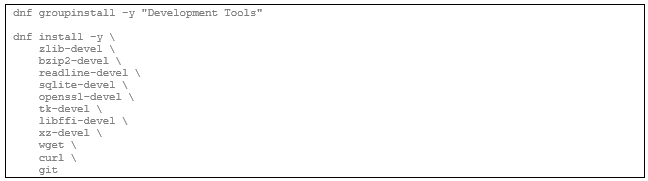
Before installing Python on a Linux system, especially when using tools like PyEnv or compiling Python manually, you need a full set of system-level development packages. These provide the compilers, headers, and libraries that Python depends on for features like compression, encryption, database access, and interactive shells.
The first command will install the toolchain and then add the essential development headers. Together, these packages ensure that when you compile Python, it will have the features required for data science and analytical work.
Install development tools:
Install PyEnv
To manage multiple Python versions cleanly, I’m using PyEnv. It lets you install and switch between different Python releases without touching the system Python that Linux depends on. This is especially useful for data science work, where different projects often require different Python versions.
This sets up:
- the PyEnv core
- PyEnv‑virtualenv (for virtual environments)
- PyEnv‑update (for keeping PyEnv current)
After running it, you’ll need to add PyEnv to your shell initialization file so it loads automatically. I’ll cover that in the next section.
Install PyEnv:

Update your bash:

Leveraging PyEnv
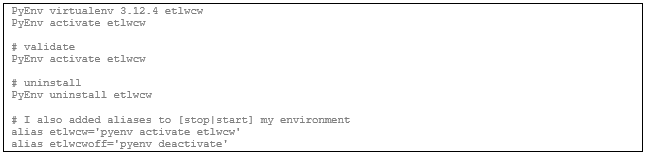
I am running RHEL 9.3, so Python was a little outdated. This is where PyEnv really shines by allowing one to have multiple versions of Python at their disposal.
Adding a modern Python release is simple. This is one of the main reasons to use PyEnv: it lets you install and switch between Python versions without touching the system Python that your OS depends on.
Install updated Python version:

Create a dedicated env:
Update Packaging Tools
Once Python is installed, it’s a good idea to upgrade the packaging tools that handle installs, builds, and dependency management. The versions bundled with Python are often outdated, and upgrading them prevents a lot of installation headaches later, especially when working with data science libraries that compile native extensions.
This updates:
- pip — the Python package installer
- setuptools — the build system used by many Python packages
- wheel — the format used for fast, precompiled package installs
With these upgrades, your environment is ready for installing the heavier data science libraries without running into avoidable build errors.
Upgrade pip + tooling:

Install Foundational Libraries
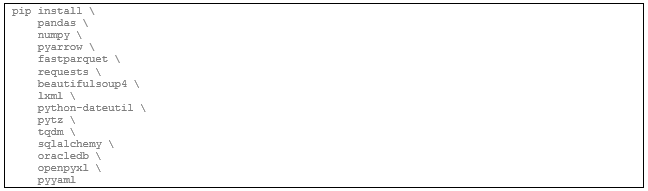
With Python ready, the next step is installing the foundational libraries used across data science, analytics, ETL, and general Python development. This set of packages covers everything from data manipulation to file formats, web scraping, database access, and progress monitoring.
Here’s what this stack gives you:
- pandas / numpy — the core of Python data analysis
- pyarrow / fastparquet — fast, modern columnar file formats (Parquet, Arrow)
- requests / beautifulsoup4 / lxml — web scraping and HTML/XML parsing
- python‑dateutil / pytz — robust date and timezone handling
- tqdm — clean progress bars for long‑running tasks
- sqlalchemy / oracledb — database connectivity, including Oracle
- openpyxl — reading and writing Excel files
- pyyaml — configuration files and structured metadata
This set forms a solid foundation for ETL pipelines, analytics workflows, and most data science projects. You can layer machine learning libraries on top later, but this gives you everything you need to start exploring data immediately.
Install analytics stack:
Use Python to validate the install:

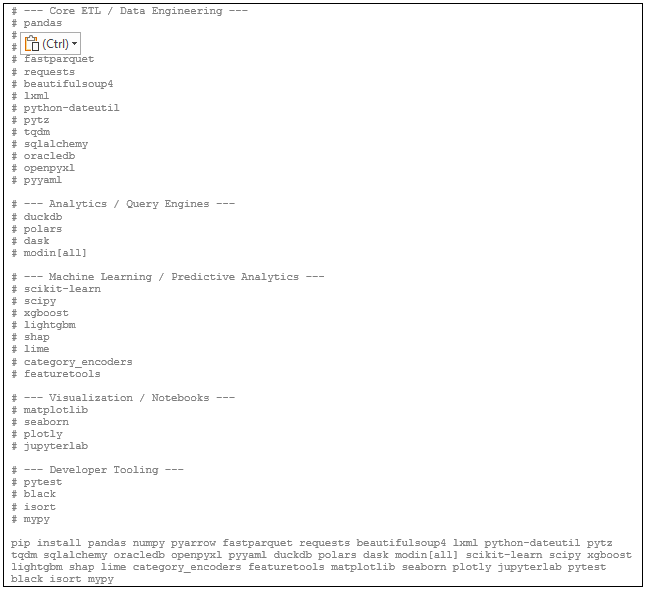
Install everything else:
ETL + Data Engineering
- pandas, polars, duckdb
- pyarrow, fastparquet
- sqlalchemy, oracledb
- requests, bs4, lxml
- tqdm, python‑dateutil, pytz
- pyyaml, openpyxl
This is everything you need for extraction, transformation, staging, and loading into Oracle.
Distributed / Scalable Compute
- dask
- modin[all]
You now have parallelized pandas‑style compute ready to go.
Machine Learning + Feature Engineering
- scikit‑learn, scipy
- xgboost, lightgbm
- shap, lime
- category_encoders
- featuretools
This is a full ML stack with explainability and automated feature engineering.
Visualization + Notebooks
- matplotlib, seaborn, plotly
- jupyterlab
Perfect for exploration once the ETL pipeline is stable.
Developer Tooling
- pytest
- black
- isort
- mypy
You are now ready to Python away…
 Missouri dBA